- Rust 83.1%
- CSS 11.8%
- JavaScript 5.1%
| src | ||
| static | ||
| tests | ||
| .gitignore | ||
| AGENTS.md | ||
| Cargo.lock | ||
| Cargo.toml | ||
| LICENSE | ||
| README.md | ||
| screenshot.png | ||


EternaLibre Notes
Free notes, forever.
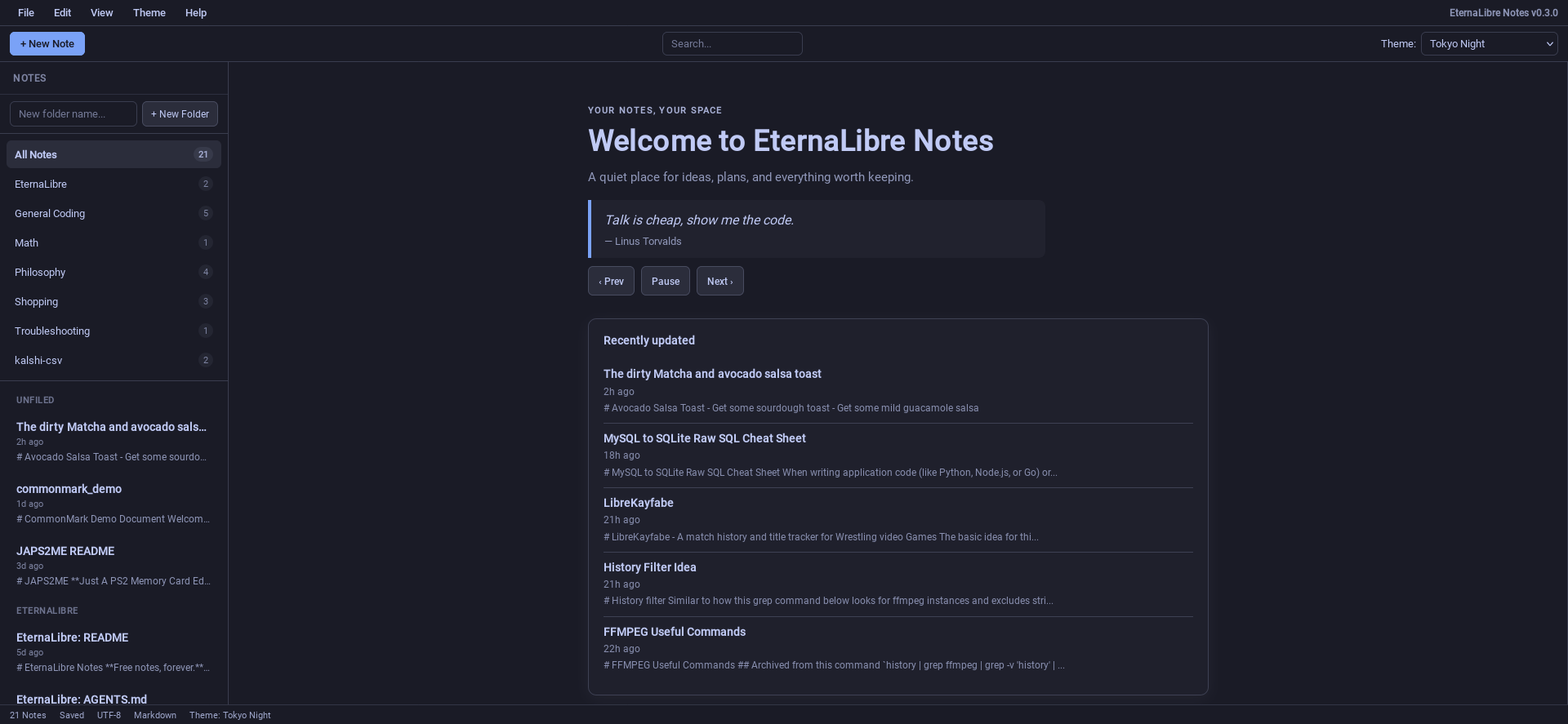
EternaLibre Notes running in Firefox ESR 140 on Debian 13.
A server-side rendered (SSR) Markdown notes application written in Rust.
EternaLibre Notes combines GNU software freedom (GPL v3.0-or-later) with the fluid elegance of Apple Notes and the predictable utility of classic desktop GUI applications: a menu bar, split-pane editor, and file-based note storage.
It is a toolkit for making a private notes cloud. You run the server yourself, on your own hardware, and notes stay in local Markdown files. The server binds to all interfaces by default, so you can reach your notes from a phone or another machine on your network, protected by a TOTP code from your authenticator app. There is no telemetry or account service. Optional weather lookup sends the location you configure to wttr.in; leave it unset to keep the app from making that request.
What's new in 0.3.0
- Welcome dashboard — recent notes and an optional local weather card fill the editor when no note is open
- Private-by-default weather — configure a location in the app; it is stored with your notes and sent to wttr.in only to retrieve weather
- Celsius/Fahrenheit choice — the weather table keeps both scales and switches without refetching
- Welcome quotes — save quote/author pairs that rotate beneath the welcome message
- Mobile weather page —
View → Weatheropens a mobile-first weather screen on phones - Mobile welcome page —
View → Welcomeopens a simplified header/quotes/recent-notes screen on phones - Quieter welcome state — with nothing open the empty preview pane, tab, and toggle are omitted
- Theme changes keep your place — changing themes while editing returns to the open note
What's new in 0.2.1
- Collapsible folder navigation — a pull-tab button on mobile and a
View → Hide/Show Folder Navtoggle at any width let you collapse the folder list to give the note list more room - Independent mobile scrolling — the folder nav and note list each scroll within their own bounded area on phones, instead of sharing one scroll position
- Save Note moved — the action now lives in the
Filemenu alongsideNew Note, rather than underEdit - Folder-nav state persists — hiding the folder nav saves the preference to browser storage and switches the sidebar to All Notes without navigating away from an open note, so unsaved edits survive
- Delete confirmation — deleting a note now asks you to confirm, showing the note's folder and title so you know exactly what you are about to remove
What's new in 0.2
- Virtual folders — organize notes into folders without creating real directories. A folder is encoded as a
[Folder]uuid.mdfilename prefix, so a single notes directory can hold many of them - Move notes between folders — drag a note onto a folder in the sidebar, use
File → Move to Folder…, or use the Move control in the editor on a phone - Re-filing is a rename —
[Work]uuid.mdbecomes[Home]uuid.md. The note's id never changes, so links to it keep working, and its modified time is not bumped - Long-press drag on touch — the re-file gesture on a phone
- Quieter folder counts — badges show across every folder in the All Notes view, and only on the folder you are inside otherwise
- Pinned folder list — folders stay visible and droppable however long the note list grows
Features
- TOTP-locked by default — authenticator app required on first launch and after every restart
- Server-side rendered with Axum and Maud — fast, type-safe HTML templates
- Uses a small amount of JavaScript — note editing, search, and the login form are plain HTML; the menus, mobile tabs, live preview, and drag-and-drop re-filing are the JS-dependent parts
- Alpine.js enhancements — live Markdown preview, instant search, keyboard shortcuts
- File-based storage — notes are persisted as Markdown files in
notes/ - Virtual folders — organize notes into folders without real directories; folders are encoded as
[Folder]uuid.mdfilename prefixes - Move notes between folders — drag a note onto a folder, use
File → Move to Folder…, or the Move control in the editor on a phone - Per-note exports — download Markdown or self-contained themed HTML, or print/save the themed note as PDF
- 40 built-in themes — including KDE Breeze, Blueberry Professional, classic desktop homages, distro-inspired palettes, warm neutrals, and more
- Markdown extras — tables, tasklists, strikethrough, and footnotes via
pulldown-cmark - Syntax highlighting — code blocks are highlighted using the current theme's ANSI palette via
syntect - Mobile responsive — collapses to a Notes/Write/Preview tab layout on phones, with 44px touch targets
- Optional weather — server-side wttr.in lookup with a Celsius/Fahrenheit choice, a current-plus-forecast table, caching, and a graceful offline fallback
- Welcome quotes — locally stored quotes rotate under the welcome message with pause and reduced-motion support
- Mobile weather page —
View → Weatheroffers a mobile-first weather view on phones
Quick Start
# Build and run (listens on 0.0.0.0:3000 by default)
cargo run

# Use a custom host/port
cargo run -- --host 127.0.0.1 --port 8080

# Serve behind a reverse proxy at a subdirectory
cargo run -- --base-path /el-notes
Then open http://127.0.0.1:3000 (or your chosen address).
Notes are stored in the notes/ directory as .md files with YAML frontmatter. If you configure weather, its location is stored in notes/.weather_location and its unit in notes/.weather_units alongside the notes and both follow --notes-dir. Saved quotes live in notes/.quotes.json.
Virtual Folders
Notes can be organized into virtual folders without creating real directories on disk. A folder is encoded as a filename prefix:
[Project Notes]550e8400-e29b-41d4-a716-446655440000.md
Root notes (no folder) keep the plain uuid.md format. Folders exist only when they contain at least one note — there is no separate folder metadata to manage.
Creating a folder: click + New Folder in the sidebar, type a name, and the app creates a new note in that folder and opens it.
Filtering: click a folder name in the sidebar to see only that folder's notes. Click All Notes to see everything grouped by folder. When a folder is active, the + New Note button creates notes in that folder.
Moving a note between folders: drag it from the sidebar onto a folder, pick File → Move to Folder…, or use the Move control under the editor on a phone. Dropping a note on All Notes — or choosing Unfiled — takes it back out of its folder.
A move renames the file: [Work]uuid.md becomes [Home]uuid.md. The note's id is left untouched, so links to it keep working, and its modified time is not bumped, since re-filing is not an edit.
Validation: folder names reject path traversal (..), shell metacharacters (;, |, &, $, backtick, parens, angle brackets), control characters, leading dots, and names over 100 characters. Invalid names show a red flash message at the top of the page.
Authentication
EternaLibre Notes is locked with TOTP. Because the server binds 0.0.0.0 by default, a code is required before any note can be read.
First launch: the server prints a QR code to your terminal and waits for a 6-digit code. Scan it with any TOTP authenticator (FreeOTP, Aegis, Bitwarden, Google Authenticator, …), or type the Base32 secret by hand if you would rather not scan. Only after a valid code is the secret committed to .totp_secret in the project root with mode 0600 — and only then does the port start listening.
Enrollment deliberately happens in the terminal rather than on a web page. There is no /setup route to reach: an HTTP-reachable setup endpoint would let anyone who can reach the port before you finish claim the device.
Every launch after that: you land on /login and need a current code. Sessions last one hour and live only in memory, so restarting the server invalidates them.
Lost your authenticator? Delete the secret and restart:
rm .totp_secret
There is no recovery-code fallback by design — that file is the only thing holding the secret, and it stays on your machine.
Behind a reverse proxy
To serve at a subdirectory, pass --base-path:
cargo run -- --base-path /el-notes
ProxyPass        /el-notes/  http://127.0.0.1:3000/  timeout=10
ProxyPassReverse /el-notes/  http://127.0.0.1:3000/
The proxy strips the prefix, so the app still sees ordinary paths and adds the prefix back when generating links, form actions, and redirects. The session cookie's Path is scoped to the prefix, so the token is not sent to sibling apps on the same host.
Command Line Options
Usage: eternalibre-notes [OPTIONS]

Options:
      --host <HOST>            Host address to bind to [default: 0.0.0.0]
  -p, --port <PORT>            Port to listen on [default: 3000]
      --notes-dir <NOTES_DIR>  Directory holding note files [default: notes]
      --base-path <BASE_PATH>  Path prefix when behind a reverse proxy subdirectory. Example: --base-path /forgejo when the app answers at https://host/forgejo/. Leave empty when mounted at the site root [default: ""]
  -h, --help                   Print help
Development
# Run tests
cargo test

# Run clippy with warnings as errors
cargo clippy -- -D warnings

# Format code
cargo fmt
Project Structure
| Path | Purpose |
|---|---|
src/main.rs |
Server entry point, CLI parsing, first-run terminal setup |
src/lib.rs |
Library root, so tests/ can drive the HTTP layer |
src/auth.rs |
TOTP secret, session store, and verification |
src/setup.rs |
First-run terminal enrollment |
src/routes.rs |
HTTP routes, auth gate, base-path joining |
src/pages.rs |
Maud SSR templates and URL generation |
src/notes.rs |
Note model and file-system persistence |
src/markdown.rs |
Markdown to HTML with syntax highlighting |
src/syntax.rs |
syntect integration and per-theme syntax color scheme generation |
src/themes.rs |
40 predefined themes and CSS variable engine |
static/style.css |
Full application stylesheet |
static/app.js |
Alpine.js component: preview, search, menus, tabs, drag-and-drop re-filing |
tests/auth_gating.rs |
End-to-end tests: auth gate, folders, note moves, nav counts, base paths, about page |
License
This program is free software: you can redistribute it and/or modify it under
the terms of the GNU General Public License as published by the Free Software
Foundation, either version 3 of the License, or (at your option) any later
version. See LICENSE for the full text.